I am a regularly read Romain's blog and have learned a lot of stuff from there. The one thing the impressed me the most was his post that read "simple tools for simple tasks ..... with cool gui" .
I developed Aetas(download link at the end) keeping in mind Romain's post "simple tools with simple tasks ..... with cool gui". So i gave it looks. The main frame screen shot :
Here I have used a custom made picture as the background. The various labels that you see were written with different font loaded at runtime.The highlight areas around the clock change their respective positions when clicked on, i.e when you click on the highlighted area which is a little lighter,when clicked on, swaps the position with the other.....
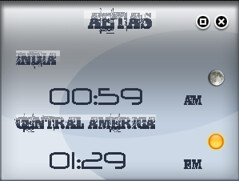
Now since the main frame is too big soI thought of adding a widget frame so that it can be run continuously. The screen shots are available in my previous post and here.
This widget frame consists of two different types of fonts.One being used as the label and the other for the clock.The switch from the main frame to the widget frame can be made by pressing the minimize button in the main frame.The transition from the main frame to the widget frame includes two animations.the first animation wraps the main frame while the second moves the widget frame to the right corner of your screen.
It also includes a splash screen(Screen shots available in the previous post).
It includes usage of GradientPaint to make the labels look better.
For downloading Aetas' binaries and sources please follow:
http://code.google.com/p/aetas
I developed Aetas(download link at the end) keeping in mind Romain's post "simple tools with simple tasks ..... with cool gui". So i gave it looks. The main frame screen shot :
Here I have used a custom made picture as the background. The various labels that you see were written with different font loaded at runtime.The highlight areas around the clock change their respective positions when clicked on, i.e when you click on the highlighted area which is a little lighter,when clicked on, swaps the position with the other.....
Now since the main frame is too big soI thought of adding a widget frame so that it can be run continuously. The screen shots are available in my previous post and here.
This widget frame consists of two different types of fonts.One being used as the label and the other for the clock.The switch from the main frame to the widget frame can be made by pressing the minimize button in the main frame.The transition from the main frame to the widget frame includes two animations.the first animation wraps the main frame while the second moves the widget frame to the right corner of your screen.
It also includes a splash screen(Screen shots available in the previous post).
It includes usage of GradientPaint to make the labels look better.
For downloading Aetas' binaries and sources please follow:
http://code.google.com/p/aetas

3 comments:
Just browsing the internet, very, very interesting blog.
thanks a lot Freddie.....
Ahaa, its fastidious discussion regarding this article at this place at this blog, I have read all that, so now me also commenting here.
Post a Comment